Curve Slides
Mental model
The curve slide utility helps you sketch curved paths first, then turn them into notes.
from margrete_rpc import Margrete
from margrete_rpc.chart.util import Curve

with Margrete() as m:
    with m.open_edit() as tx:
        slide = (
            Curve(t=(0, 0), x=-1)
            .to(t=(1, 0), x=13, ease_x="in_out_cubic")
            .to_slide(w=4)
            .clamp()
        )
        tx.chart.notes.append(slide)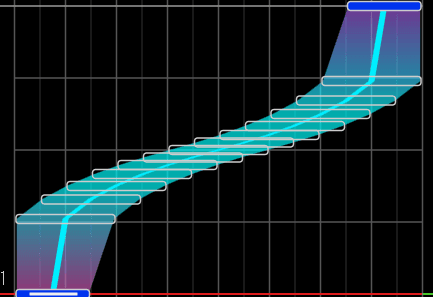
A Curve stores a list of Waypoint. Waypoint has following fields:
| Field | Meaning |
|---|---|
t | tick or Position tuple. |
x | Lane position. |
h | Air height. |
ease_x | Easing used for lane movement into this waypoint. |
ease_h | Easing used for height movement into this waypoint. |
The first waypoint anchors the start of the curve, so its easing values do not affect the path.
Use to(...) to add waypoints. Each waypoint must be later
than the previous one.
from margrete_rpc.chart.util import Curve

path = (
    Curve(t=(0, 0), x=2, h=60)
    .to(t=(0, 2), x=12, h=120, ease_x="out_cubic", ease_h="in_sine")
    .to(t=(1, 0), x=4, h=80, ease_x="in_cubic", ease_h="out_sine")
)
Positions are resolved the same way as note constructors. Inside with m.open_edit() blocks, tuple positions
use the chart's time signatures. See Time & Musical Position for the full timing model.
Materialize Notes
You eventually need to materialize the curve into a note.
The methods below use easing functions to fit the curve into a series of straight-line nodes.
If the generated note extends outside the lane range, call .clamp() to constrain all nodes to
the lanes.
Slide
Use to_slide().
You need to pass the width parameter w=.
from margrete_rpc.chart.util import Curve

slide = (
    Curve(t=(0, 0), x=0)
    .to(t=(0, 2), x=8, ease_x="out_quad")
    .to(t=(1, 0), x=4, ease_x="in_quad")
    .to_slide(w=4)
)
AirSlide
Use to_air_slide(). Pass h= on the curve start and on
waypoints where the height should change.
You need to pass the width parameter w=.
from margrete_rpc.chart.notes import Tap
from margrete_rpc.chart.util import Curve

air_slide = (
    Curve(t=(0, 0), x=4, h=60)
    .to(t=(0, 2), x=10, h=120, ease_x="in_out_sine", ease_h="out_quad")
    .to(t=(1, 0), x=6, h=80, ease_x="in_out_sine", ease_h="in_quad")
    .to_air_slide(w=4)
)

parent = Tap(t=air_slide.t, x=air_slide.x, w=air_slide.w).add_air(air_slide)
AirCrush
Use to_air_crush().
You need to pass the width parameter w= and the gap= parameter. See AirCrush
for how to write gap.
from margrete_rpc.chart.util import Curve

crush = (
    Curve(t=(0, 0), x=2, h=80)
    .to(t=(1, 0), x=14, h=120, ease_x="out_expo", ease_h="in_out_sine")
    .to_air_crush(w=2, gap=(1, 16), color="blue")
)
Limiting resolution
The materialize methods snap joint tick to absolute multiples of
grid. The default is 5, pass grid=1 for full resolution.
slide = (
    Curve(t=(0, 0), x=0)
    .to(t=(1, 0), x=13, ease_x="in_out_sine")
    .to_slide(w=2, grid=1)  # full resolution; default grid=5 snaps joints to multiples of 5 (1/384)
)
Edit Waypoints
Call points() to preview the quantized curve. Pass
grid= to snap joints to a tick grid.
path = Curve(t=(0, 0), x=0).to(t=(1, 0), x=12, ease_x="in_out_sine")

for point in path.points():
    print(point.t, point.x, point.h)
Use at(tick) to evaluate the curve at a specific tick.
path = Curve(t=0, x=0, h=80).to(t=960, x=12, h=120)
mid = path.at(480)

print(mid.x, mid.h)
Use then() or + to join curves.
from margrete_rpc.chart.util import Curve

out = Curve(t=(0, 0), x=0).to(t=(0, 2), x=12, ease_x="out_cubic")
back = Curve(t=(0, 2), x=12).to(t=(1, 0), x=4, ease_x="in_cubic")

slide = (out + back).to_slide(w=4)
Import Waypoints From Notes
Use Curve.from_note() when you want to import an existing
long note as curve waypoints.
from margrete_rpc.chart.util import Curve

path = Curve.from_note(existing_slide)

for point in path.waypoints:
    point.ease_x = "out_cubic"  # Change every waypoint's easing to "out_cubic"

copy = path.to_slide(w=existing_slide.w)
The note's width is dropped because Curve itself is width-agnostic.