Timing Utilities
What is this
If you want to create complex timing effects, these utility functions are a good place to start.
They return lists of speed events (TimelineSpeedEvent).
from margrete_rpc.chart.util import timing_easing

with m.open_edit() as tx:
    tx.chart.tils.extend(
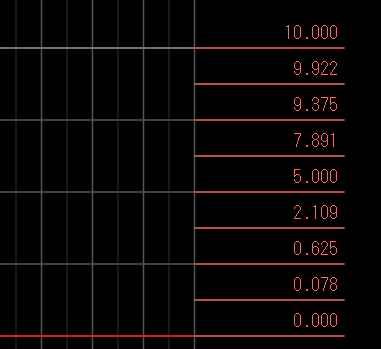
        timing_easing(
            t0=(0, 0),
            t1=(1, 0),
            start_speed=0.0,
            end_speed=10.0,
            count=8,
            easing="in_out_cubic",
        )
    )
Glitch stutters
Use timing_glitch(...) for a quick stutter effect. It places
count evenly spaced speed spikes from t0 up to, but not including, t1. Each spike lasts spike_ticks
ticks (default 5), then the speed resets to base_speed.
from margrete_rpc.chart.util import timing_glitch

events = timing_glitch(
    t0=(24, 0),
    t1=(24, 2),
    count=4,
    speed_range=2.0,
    base_speed=1.0,
    spike_ticks=5,
)

with m.open_edit() as tx:
    tx.chart.tils.extend(events)
The spike speeds alternate around base_speed:
# base_speed=1.0, speed_range=2.0
# spike speeds: -1.0, 3.0, -1.0, 3.0
freeze = timing_glitch(
t0=(32, 0),
t1=(33, 0),
count=8,
speed_range=3.0,
base_speed=0.0,
)timing_glitch(...) returns two events per spike: the spike event, then the reset event spike_ticks ticks
later. A count of 8 returns 16 events.
Speed ramps
Use timing_easing(...) when you want the speed itself to move
from start_speed to end_speed.
from margrete_rpc.chart.util import timing_easing

slow_into_fast = timing_easing(
    t0=(40, 0),
    t1=(44, 0),
    start_speed=0.5,
    end_speed=2.0,
    count=16,
    easing="in_out_sine",
)

with m.open_edit() as tx:
    tx.chart.tils.extend(slow_into_fast)
count is the number of subdivisions between t0 and t1. The helper returns count + 1 events, including
one event exactly at t0 and one event exactly at t1.
Displacement-controlled speed ramp
Use timing_easing_by_disp(...) when you need the total
displacement over the speed-change interval to stay fixed.
from margrete_rpc.chart.util import timing_easing_by_disp

motion = timing_easing_by_disp(
    t0=(48, 0),
    t1=(52, 0),
    base_speed=1.0,
    count=24,
    easing="out_cubic",
)

with m.open_edit() as tx:
    tx.chart.tils.extend(motion)