Margrete RPC

Getting Started

Install Margrete RPC and write your first chart script.

Margrete RPC is a Margrete plugin plus a Python client package that lets you script chart editing for UMIGURI/Margrete.

Use it to read and rewrite charts programmatically: place notes, edit events, and apply changes inside the editor.

Requirements

  • Python 3.13 or later
  • Margrete 1.8.0 or later

Installation

1. Install the plugin

  1. Download the latest release from the GitHub Releases page.

  2. Open margrete-rpc-vX.X.X.zip and copy margrete-rpc.dll and margrete-rpc.ini to your Margrete plugins directory.

    margrete-rpc.dll
    margrete-rpc.ini
    Margrete iconMargrete.exe
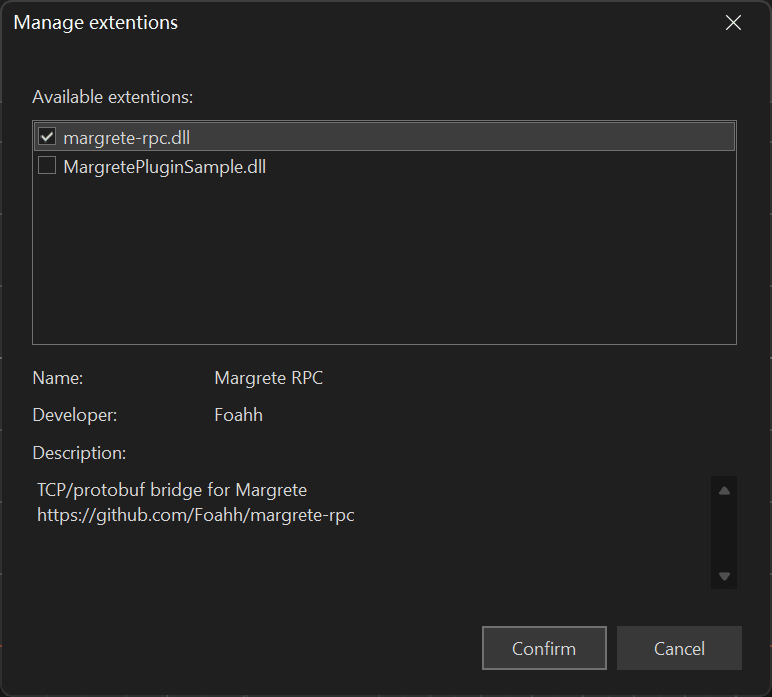
  3. Restart Margrete. Then open ExtensionsManage Extensions, enable margrete-rpc.dll, and click Confirm.

    Enable the plugin

2. Install the Python package

pip install margrete-rpc
uv add margrete-rpc

Quick start

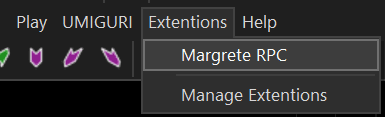
  1. In Margrete, open ExtensionsMargrete RPC to start the plugin.

    Extension to Margrete RPC
    👉
    Start the plugin
    You need to start the plugin each time Margrete restarts.
  2. Create a file called example.py:

    from margrete_rpc import Margrete
    from margrete_rpc.chart.notes import Tap
    
    m = Margrete()  # auto-detect the running plugin instance
    status = m.status()
    print(f"Plugin v{status.server_version} (pid {status.pid})")
    print(f"Log: {status.log_path}")
    
    with m.open_edit() as tx:
        tx.chart.notes.append(Tap(t=0, x=0, w=4))
        # changes are applied when this block exits successfully

    This connects to Margrete, prints the ServerStatus, opens an edit transaction, and appends a Tap note to the chart.

  3. Run the script and check the editor:

    python example.py

    A new tap note will appear in the editor.

    Margrete editor changes after quick start

Handle multiple Margrete instances

Margrete() with no arguments works when exactly one running plugin instance is discovered.

When multiple Margrete instances are running, pass endpoint or instance_id.

Use list_instances() when you need to inspect available MargreteInstance values first:

from margrete_rpc import Margrete, list_instances

# list all discovered instances
for inst in list_instances():
    print(inst.instance_id, inst.endpoint)

# connect by explicit host:port (left Margrete)
m_left = Margrete(endpoint="127.0.0.1:1328")

# connect by the instance_id (right Margrete)
m_right = Margrete(instance_id="47824-6a30f65d-b7f8afde84506008")

Two Margrete instances with different endpoints

On this page