Editing Notes
Mental Model
from margrete_rpc.chart.notes import Tap

with m.open_edit(snapshot=False) as tx:
    a = Tap(t=5760, x=4, w=4)
    b = Tap(t=(2, 0, 0), x=0, w=4)
    c = Tap(t=(2, 1, 0), x=0, w=4)

    a.t == b.t  # True

    tx.chart.notes.extend([a, b, c])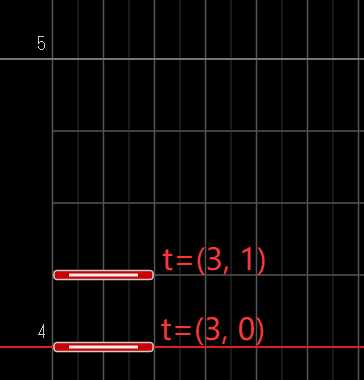
In this example, the script places three Tap notes in the chart. A note usually contains these fields:
| Field | Meaning |
|---|---|
t | The note's timing. See Time & Musical Position for details. |
p | The note position (Position). For example, (1, 0, 0) means 2nd bar, 1st beat. See Time & Musical Position for details. |
x | The note's lane position. The usual range is 0 to 15. |
w | The note's width. |
h | The Air height. Only Air long notes and AirCrush use it. |
Ground Notes
Ground notes usually have t, x, and w fields.
Tap
from margrete_rpc.chart.notes import Tap

note = Tap(t=(0, 0), x=4, w=4)
Flick
Flick has an additional dir field for the flick direction.
from margrete_rpc.chart.notes import Flick, FlickDirection

left = Flick(t=(0, 0), x=4, w=4, dir=FlickDirection.LEFT)
right = Flick(t=(0, 1), x=4, w=4, dir="right")
auto = Flick(t=(0, 2), x=4, w=4)  # defaults to "auto"
dir accepts FlickDirection, or a direction string: "auto", "left" and "right".
Extap
Extap has an additional dir field for the direction of its burst effect.
from margrete_rpc.chart.notes import Extap, ExtapDirection

up = Extap(t=(0, 0), x=4, w=4, dir=ExtapDirection.UP)
spin = Extap(t=(0, 1), x=4, w=4, dir="rotate_left")
dir accepts ExtapDirection, or a direction string: "up", "down", "center", "left", "right", "rotate_left", "rotate_right", "in_out" and "out_in".
Damage
from margrete_rpc.chart.notes import Damage

note = Damage(t=(0, 0), x=4, w=4)
Long Notes
Long notes have a start point and one or more joints.
To mutate the current long note directly, use add_step() and add_ctrl() to add joints:
slide = Slide(t=(0, 0), x=0, w=4)
slide.add_ctrl(t=(0, 2), x=8, w=4)
slide.add_step(t=(1, 0), x=4, w=4)
with_step() and with_ctrl() return a deep copy of the current long note, which is useful when you want to keep the original note unchanged:
from margrete_rpc.chart.notes import Slide

slide = (
    Slide(t=(0, 0), x=0, w=4)
    .with_ctrl(t=(0, 2), x=8, w=4)
    .with_step(t=(1, 0), x=4, w=4)
)
Joints must be added in increasing time order. A long note must have at least one joint before it is sent to Margrete.
Hold
Hold starts at the start point and ends at a Step joint.
from margrete_rpc.chart.notes import Hold

hold = Hold(t=(0, 0), x=4, w=4).with_step(t=(1, 0), x=4, w=4)
Slide
Slide has multiple Step and Control joints.
from margrete_rpc.chart.notes import Slide

slide = (
    Slide(t=(0, 0), x=0, w=4)
    .with_ctrl(t=(0, 2), x=8, w=4)
    .with_step(t=(1, 0), x=4, w=4)
)
When the note is sent to Margrete, the final joint is automatically converted to Step.
AirCrush
AirCrush has these additional fields:
| Field | Meaning |
|---|---|
h | Height. |
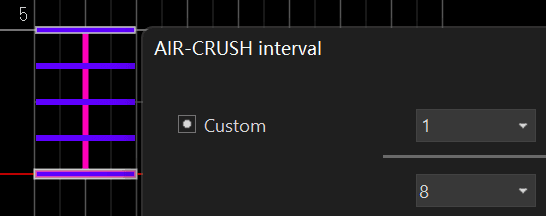
gap | Step interval. See Time & Musical Position for details. |
interval | The Step interval as a division. For example, gap=(1, 8) means an eighth note. See Time & Musical Position for details. |
color | Line color, as ColorValue or a color string. |
color accepts these string values: "default", "red", "orange", "yellow", "green", "sky", "blue", "violet", "pink", "white", "black", "grass", "sky_blue", "cobalt_blue", "purple" and "none".
gap also has special values:
| Constant | Value | Effect |
|---|---|---|
AIRCRUSH_GAP_TRACELIKE | 0 | AirTrace (line only). |
AIRCRUSH_GAP_HEADONLY | 0x7FFFFFFF | Head Step only. |
from margrete_rpc.chart.notes import AirCrush

crush = (
    AirCrush(t=(0, 0), x=4, w=4, h=80, gap=(1, 8), color="blue")
    .with_ctrl(t=(0, 2), x=6, w=4, h=100)
    .with_ctrl(t=(1, 0), x=8, w=4, h=80)
)
Air Notes
Air notes must be attached to ground notes.
You can assign .air directly:
from margrete_rpc.chart.notes import Air, AirDirection, Tap

tap = Tap(t=(0, 0), x=4, w=4)
air = Air(AirDirection.UP, t=(0, 0), x=4, w=4)

tap.air = air
You can also use add_air():
tap.add_air(air)with_air() returns a deep copy of the current ground note, which is useful when you want to keep the original note unchanged:
tap_with_air = tap.with_air(Air("up", t=(0, 0), x=4, w=4)) # original Tap unchangedThe Air note's position must match the note it is attached to:
- For a ground note, it must match the note's
t,x, andw. - For a long note, it must match the final joint's
t,x, andw.
Standalone Air
Air has an additional dir field for its direction.
It also has an inverted field; set it to True to invert its color.
from margrete_rpc.chart.notes import Air, AirDirection, Tap
air = Air(AirDirection.UP, t=(0, 0), x=4, w=4)
air = Air("up", t=(0, 0), x=4, w=4)
dir accepts AirDirection, or a direction string: "up", "down", "up_left", "up_right", "down_left" and "down_right".
AirHold
AirHold works like Hold, but adds an h field:
It also has an inverted field; set it to True to invert its color.
from margrete_rpc.chart.notes import AirHold, Hold

hold = Hold(t=(0, 0), x=4, w=4).with_step(t=(1, 0), x=6, w=4)

hold.add_air(
    AirHold(t=(1, 0), x=6, w=4, h=80)
    .with_step(t=(1, 2), x=6, w=4, h=120)
)
AirSlide
AirSlide works like Slide, but adds an h field:
It also has an inverted field; set it to True to invert its color.
from margrete_rpc.chart.notes import AirSlide, Slide

slide = Slide(t=(0, 0), x=0, w=4).with_step(t=(1, 0), x=8, w=4)

slide.add_air(
    AirSlide(t=(1, 0), x=8, w=4, h=80)
    .with_ctrl(t=(1, 2), x=10, w=4, h=120)
    .with_step(t=(2, 0), x=8, w=4, h=80)
)
Validating Notes
When open_edit() exits normally, Python validates all chart notes to make sure they follow charting rules. If you want to catch invalid notes earlier, call note.validate() manually.
note.validate() # raises ValueError if invalidCommon validation failures include:
- zero or negative note width,
- long-note joints that are not in increasing time order,
- missing joints on long notes,
- Air notes whose
t/x/wdo not match the attached note.