Edit Transactions
Read and modify chart notes and events.
An edit transaction is the normal way to script chart changes with Margrete RPC.
Open a transaction, modify the chart, then exit the with block.
from margrete_rpc import Margrete
from margrete_rpc.chart.notes import Tap

m = Margrete()

with m.open_edit() as tx:
    tx.chart.notes.append(Tap(t=(0, 0), x=4, w=4))
The edit is sent to Margrete when the with block exits normally. If the block raises an
exception, no changes are applied.
For the exact method signature, see Margrete.open_edit() and the EditTransaction reference.
Mental model
Think of open_edit() as a four-step workflow:
- Snapshot - Margrete sends the current raw notes, events, and cursor tick to Python.
- Parse - The Python API converts
RawNoteobjects toNoteobjects such asTapandSlide.
Ifraw_notes=True, this step keeps every note asRawNoteinstead. - Mutate - Your script edits normal Python objects: lists, notes, and event objects.
- Apply - The Python client compares the final chart to the snapshot and sends one undoable edit.
The EditTransaction object has three things you will use most often:
| Object | What it is for |
|---|---|
tx.chart.notes | A mutable list of chart notes. See the Chart reference. |
tx.chart.events | Mutable event lists for BPM, time signatures, scroll speed, and note speed. |
tx.current_tick | The editor cursor tick captured when the transaction opened. |
tx.chart.events groups chart events by kind. See Events for examples that add, mutate, and filter each event list:
| List | Contains |
|---|---|
tx.chart.events.bpm | BpmEvent(t, bpm) tempo changes. |
tx.chart.events.beat | BeatEvent(bar, beats_per_bar, beat_unit) time-signature changes. |
tx.chart.events.til | TimelineSpeedEvent(til, t, speed) scroll-speed changes. |
tx.chart.events.note_speed | NoteSpeedEvent(t, speed) note-speed changes. |
Practical examples
Reading the chart
from margrete_rpc import Margrete
from margrete_rpc.chart.notes import Tap

m = Margrete()

with m.open_edit() as tx:
    for note in tx.chart.notes:
        if isinstance(note, Tap):
            print(f"Tap at tick {note.t}, lane {note.x}")

    for event in tx.chart.events.bpm:
        print(f"BPM {event.bpm} at tick {event.t}")

    for event in tx.chart.events.beat:
        print(f"Bar {event.bar}: {event.beats_per_bar}/{event.beat_unit}")
Add a note at the current cursor
Use tx.current_tick when you want the edit to happen where the red playhead is in
Margrete.
from margrete_rpc import Margrete
from margrete_rpc.chart.notes import Tap

m = Margrete()

with m.open_edit() as tx:
    tx.chart.notes.append(Tap(t=tx.current_tick, x=4, w=4))
Move every note right by two lanes
Notes are regular objects. Transform methods mutate them in place. See Note Transforms for examples and the Note reference for exact signatures.
with m.open_edit() as tx:
    for note in tx.chart.notes:
        note.shift(x=2)
Transforms also update long-note joints and attached air notes, so this works for more than just taps.
Delete notes in a lane range
Assign a filtered list back to tx.chart.notes.
with m.open_edit() as tx:
    # Keep only notes that start at lane 4 or later.
    tx.chart.notes = [note for note in tx.chart.notes if note.x >= 4]
There is a known issue with undoing transactions that deleted notes. See Limitations for details.
Replace all notes with new notes
Use replace_all=True when the script is intentionally replacing every note in the chart.
from margrete_rpc.chart.notes import Tap

with m.open_edit(replace_all=True) as tx:
    tx.chart.notes = [
        Tap(t=(0, 0), x=0, w=4),
        Tap(t=(0, 1), x=4, w=4),
        Tap(t=(0, 2), x=8, w=4),
        Tap(t=(0, 3), x=12, w=4),
    ]
Edit BPM and speed events
Events live under tx.chart.events. You can inspect, append, filter, or mutate those
lists the same way you edit notes.
from margrete_rpc.chart.events import BpmEvent, TimelineSpeedEvent

with m.open_edit() as tx:
    tx.chart.events.bpm.append(BpmEvent(t=0, bpm=180.0))

    # Timeline speed event: timeline id, tick, speed multiplier.
    tx.chart.events.til.append(TimelineSpeedEvent(til=0, t=(4 * 1920), speed=1.5))

    # Remove note-speed events after bar 8 in a 4/4 chart.
    tx.chart.events.note_speed = [
        event for event in tx.chart.events.note_speed if event.t < 8 * 4 * 1920
    ]
Inspect unsupported notes safely
By default, the Python API parses recognized RawNote objects into Note objects such as Tap or Slide. If it sees an unsupported note, it keeps that note as RawNote instead of dropping it.
from margrete_rpc.chart.notes import RawNote

with m.open_edit() as tx:
    for note in tx.chart.notes:
        if isinstance(note, RawNote):
            print(note.type, note.t, note.x, note.w)
Pass raw_notes=True when you want every note to stay in the low-level raw form.
with m.open_edit(raw_notes=True) as tx:
    for note in tx.chart.notes:
        print(note.type, note.t, note.x, note.w)
Cursor position
The cursor is the red playhead line in the editor. See the Margrete docs if you are unfamiliar with it.
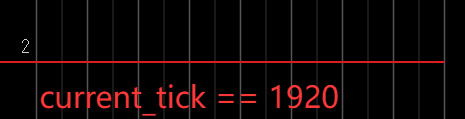
Use m.current_tick() when you need the live cursor position outside a transaction:
tick = m.current_tick()Inside a transaction, use tx.current_tick. It is captured when the transaction opens
and does not change while the block runs:
with m.open_edit() as tx:
    tick = tx.current_tick
Undo and redo
You can trigger undo and redo from Python:
m.undo()  # returns True if something was undone
m.redo()  # returns True if something was redone
open_edit options
| Parameter | Default | Use it when |
|---|---|---|
snapshot | True | You want to read the current chart and send only the differences on exit. This is the default for normal edits. |
replace_all | False | You want the final tx.chart.notes list to replace all notes in the chart. Useful for generated rewrites. |
raw_notes | False | You want every note as a RawNote instead of Note objects. |
event_scan_lookahead_ticks | None | You need to scan for scroll-speed events farther past the last note. None uses the server default. |
event_scan_til_ids | None | You need to control which timelines are scanned for scroll-speed events. None scans timelines that carry notes; [] scans all default timelines 0 through 15. |
Common forms:
# Normal edit: snapshot on enter, diff on exit.
with m.open_edit() as tx:
    ...

# Full note rewrite.
with m.open_edit(replace_all=True) as tx:
    tx.chart.notes = build_notes()

# Raw low-level editing.
with m.open_edit(raw_notes=True) as tx:
    ...

# Insert generated notes without reading existing notes first.
with m.open_edit(snapshot=False) as tx:
    tx.chart.notes = build_notes()

# Read scroll-speed events farther beyond the last note.
with m.open_edit(event_scan_lookahead_ticks=1920 * 16) as tx:
    ...

# Scan specific timelines for scroll-speed events.
with m.open_edit(event_scan_til_ids=[0, 1, 2]) as tx:
    ...